You're staring at an email that looks right and feels wrong. Maybe it's an invoice from a supplier, a password reset you didn't request, or your own campaign landing in spam. The visible sender won't settle it. You need to know how to view email header data, save it intact, and separate what each field claims from what it can really prove.
Table of Contents
Where Each Email App Hides the Header
Every major client keeps the raw header behind a menu, and the labels differ. Gmail calls it Show original, Outlook buries it in properties or message details, and Apple Mail calls it All Headers. Confirm the label in your version, because menus change between releases.
Most phone apps don't expose the full raw text. The Gmail app offers Show original under the message's three-dot menu, but most other mobile apps don't, so switch to a desktop browser or desktop client for this work. A screenshot of the visible sender isn't a substitute.
| Email App | Menu Path | What You Get |
|---|---|---|
| Gmail on desktop | More (three dots) beside Reply > Show original | Full raw header and message text |
| Outlook classic on Windows | Open message outside Reading Pane > File > Properties | Raw text in the Internet headers box |
| New Outlook for Windows | More actions > View > View message details | Message details panel, summary view |
| Apple Mail on macOS | View > Message > All Headers | Full header shown above the body |
| Thunderbird | View > Message Source (or Ctrl+U) | Complete raw source including headers |
| Yahoo Mail on desktop | More (three dots) > View raw message | Full raw message including headers |
Confirm You've Found the Right View
The new Outlook details panel is a summary and may not show every raw line. When evidence matters, I would use the raw view instead of trusting the panel to be complete. If you can, open the same message in classic Outlook or webmail and compare.
You're in the right place when you see a dense block of lines beginning with Received, From, Date and Message-ID. If you only see a tidy summary with sender and subject, you haven't reached the raw header yet.
How to Save the Raw Header Before You Read It
Copy first, interpret second. A header you've partly retyped, trimmed, or reformatted is no longer evidence, and you can't reconstruct lines you discarded.
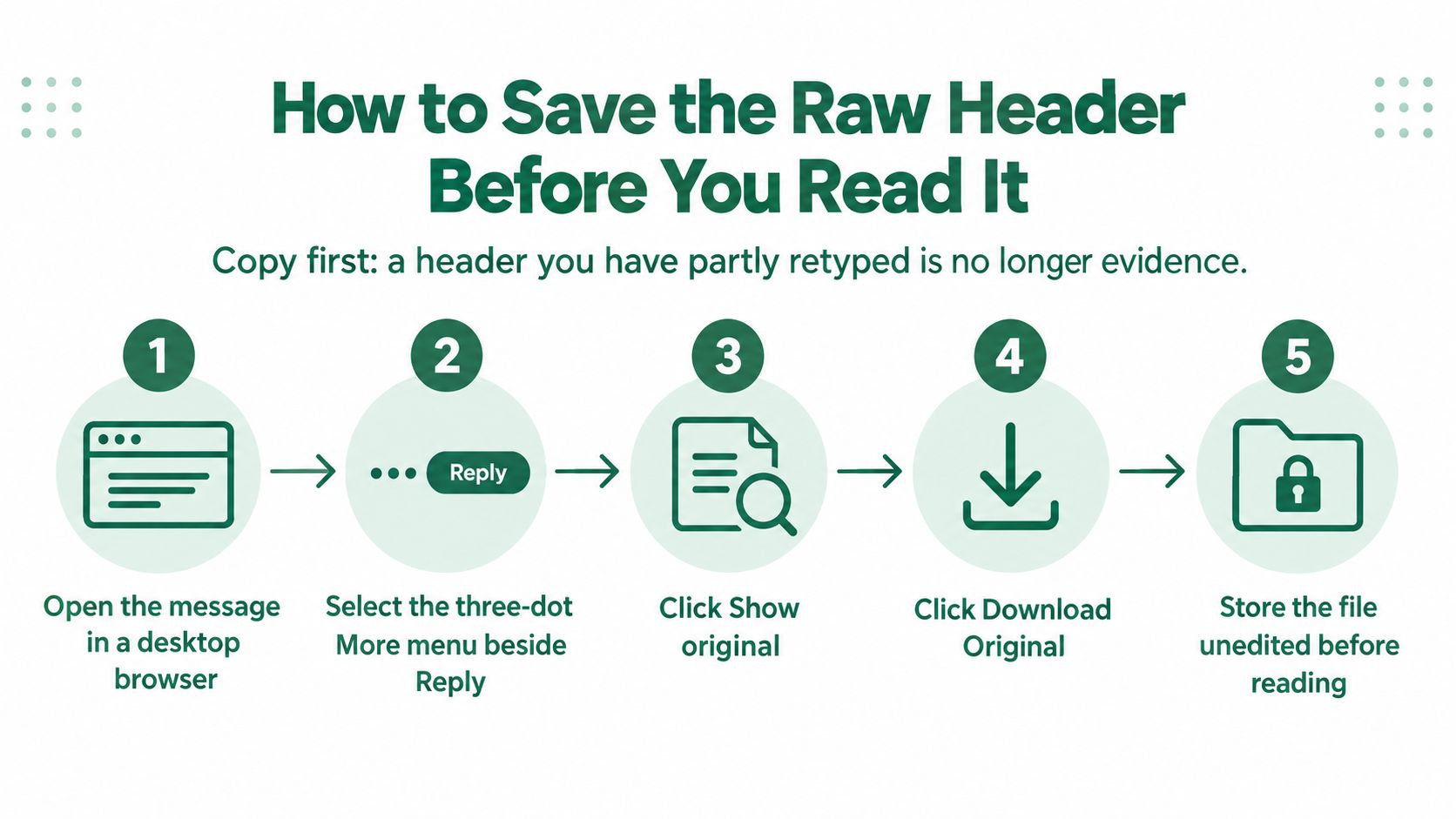
Gmail in a Desktop Browser
The Gmail help page on tracing an email describes the desktop route to the complete header for analysis.
- Open the message in a desktop browser.
- Select the three-dot More menu beside Reply.
- Choose Show original.
- Use Copy to clipboard.
- Paste into a plain-text file and save it with the date and sender in the filename.
Outlook, Apple Mail and Thunderbird
- In classic Outlook, open the message outside the Reading Pane.
- Go to File, then Properties.
- Copy everything in the Internet headers box, from the first line to the last.
Apple Mail and Thunderbird follow the same save rule. Copy the All Headers text in Apple Mail, or the full message source from Thunderbird's View > Message Source, paste it into a plain-text file, and trim nothing. Don't paste into a word processor that rewraps or restyles lines.
The mistake to avoid is copying only From, To and Subject. That strips out the routing and authentication lines, which are the parts that let anyone diagnose spoofing, delay or misconfiguration.
Practical Rule
Keep one unedited master copy. Work from a duplicate, and annotate the duplicate, never the original.
Before you paste a header into any public analyser, redact email addresses, message IDs, internal hostnames and unique tracking values. Keep the unredacted copy for your own records, because a redacted version can't always be matched back to server logs later.
Header Fields That Matter and What They Prove
Headers aren't freeform notes. The Internet Message Format standard, RFC 5322, published in October 2008 defines each field as a name and value separated by a colon, with a header section followed by a body. It identifies the origination date and originator address as the only required header categories.
That narrow requirement matters. Most fields you rely on during an investigation are normal practice, not proof in themselves. Date records a four-digit year, numeric day, month, time and time-zone offset, with valid years 1900 or later. Message-ID should normally be present and gives a unique identifier for one version of a message.
| Field | What It Records | What It Cannot Prove |
|---|---|---|
Date |
When the message was written, with a four-digit year and time-zone offset | Creation time as claimed, not verified delivery time |
Message-ID |
A unique identifier for one version of the message | That the sender is genuine; the ID can be generated by any system |
From |
The sender address the recipient sees | Origin; this field is easy to forge |
Received |
Each server hop, with server name, IP, timestamp and offset | Sender identity; earlier lines can be forged |
Return-Path |
The address that receives bounces, set at delivery | That the visible From domain is legitimate |
Reply-To |
Where replies are directed | Anything about the sending infrastructure |
Read Claims, Then Look for Corroboration
From is a claim about authorship. Date is a claim about when the message was written, supplied by the sending system. Reply-To only tells you where a reply would go, which is useful when it points to an unrelated domain, but it says nothing about who sent the message.
Received is different in kind, because each server adds its own trace at each hop. That's why it's weighed before the identity fields, and why the authentication fields need their own sequence after the route is understood. Weak header discipline is also one reason legitimate mail fails checks discussed in why emails go to spam.
No single field decides the question. A field records a claim, and only corroboration across fields supports it. If From, Return-Path, the route and the authentication domains all point the same way, you have a defensible conclusion. If they diverge, you have a lead, not a verdict.
How to Trace the Delivery Path From Received Lines
An invoice appears to come from a regular supplier and arrives at 9:12. The display name is right and the domain looks right at a glance. Then the earliest Received hop names an unfamiliar hosting provider instead of the supplier's usual mail service. That is your first concrete reason not to pay yet.
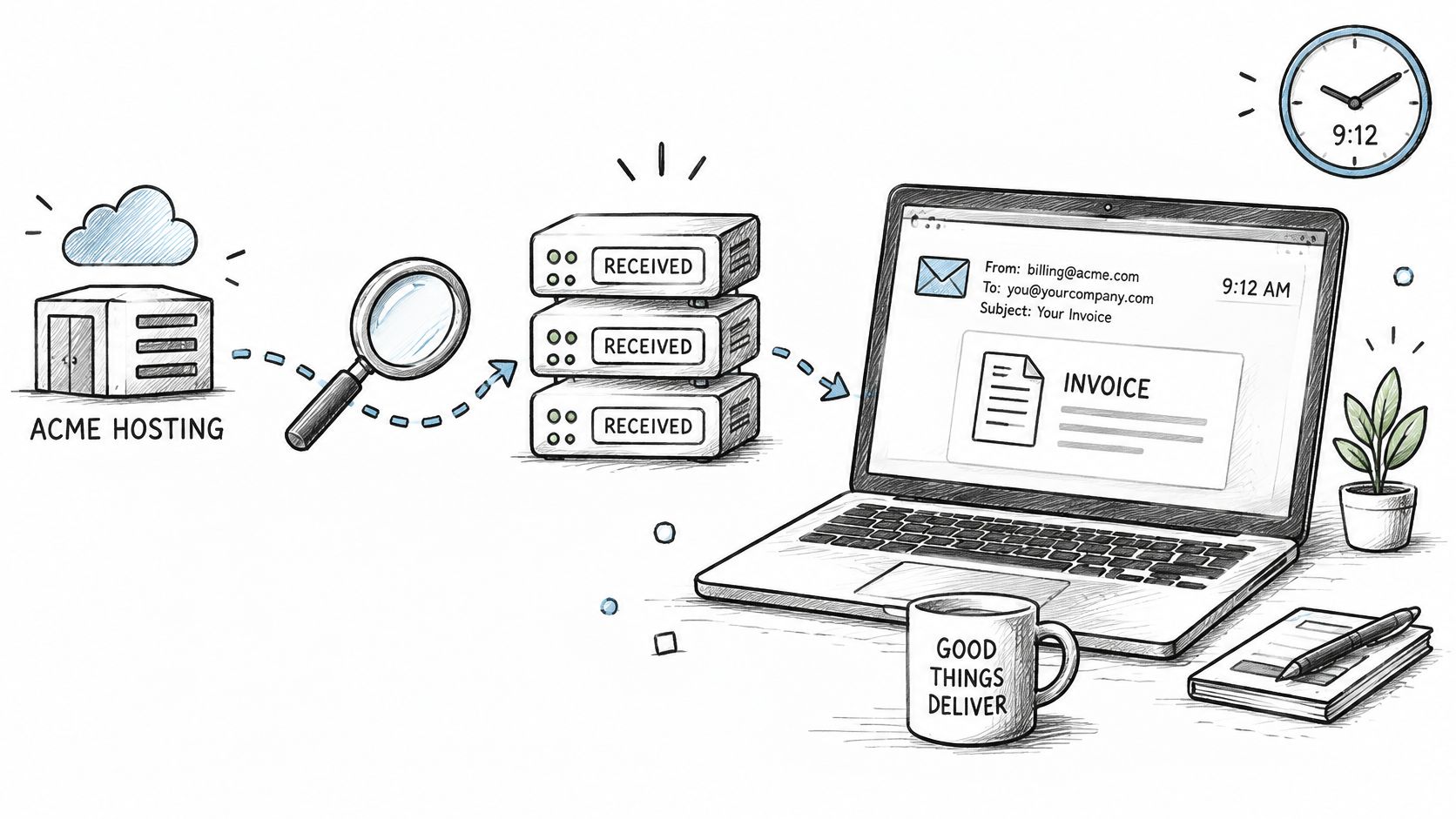
Internet mail documentation defines Received as a trace of the mail-transfer agents a message passed through, and the IETF mail attributes reference sets that alongside Message-ID for identity and Date for when the message was written. Each hop line is a claim one server made about the server before it. Read the whole chain as claims first, then decide which of them hold up.
Work the Chain From the Bottom Up
- Find every
Receivedline in the saved header. - Start with the bottom-most line, which is the earliest recorded hop.
- Note the server name, IP address, timestamp and time-zone offset on each line.
- Calculate the gap between each pair of hops after converting times to one zone.
- Treat the top line, added by your own receiving server, as the most trustworthy boundary.
Annotate a copy so the raw lines stay untouched. Once you start highlighting and reordering, it is easy to lose the original sequence, and the sequence is the evidence.
Long gaps can mean queueing, scanning or a forwarding service holding the message. They prove delay, nothing more. What deserves attention is a pattern: time moving backwards between hops, an internal-sounding relay arriving from public infrastructure, or a route that contradicts the sender's claimed origin.
Earlier lines can be forged because a sender can submit a message with fake Received entries already attached. Your receiving system then prepends its own genuine line above them. I would trust that top-added trace first and treat everything below it as unverified until logs or a known-good message confirm it. In practice, the bottom hops tell you what the sender wants you to believe, and the top hop tells you what your own infrastructure saw.
The bottom line is the start of the story, but the first line your own server wrote is the first line you can rely on.
Header patterns carry real weight as signals in spam and phishing detection. Filtering systems scrutinise hop order, timing anomalies and origin mismatches for the same reason you are tracing them now: a route is difficult to fabricate cleanly end to end. That is what makes ten minutes on the chain worthwhile.
For delay investigations, compare the suspicious route with a known legitimate message from the same sender. Same relays, same order and similar timing usually means normal delivery. A new earliest hop combined with a high-pressure request means verify through a separate channel before you act.
How to Check SPF, DKIM and DMARC Results
Start with Authentication-Results, the line your receiving server writes after it runs its checks. Read it together with DKIM-Signature, Return-Path, From and Received, because no single field is decisive. Most of a header is the sender's claim about itself. The Authentication-Results line is the part your own infrastructure vouches for, so it anchors everything else.
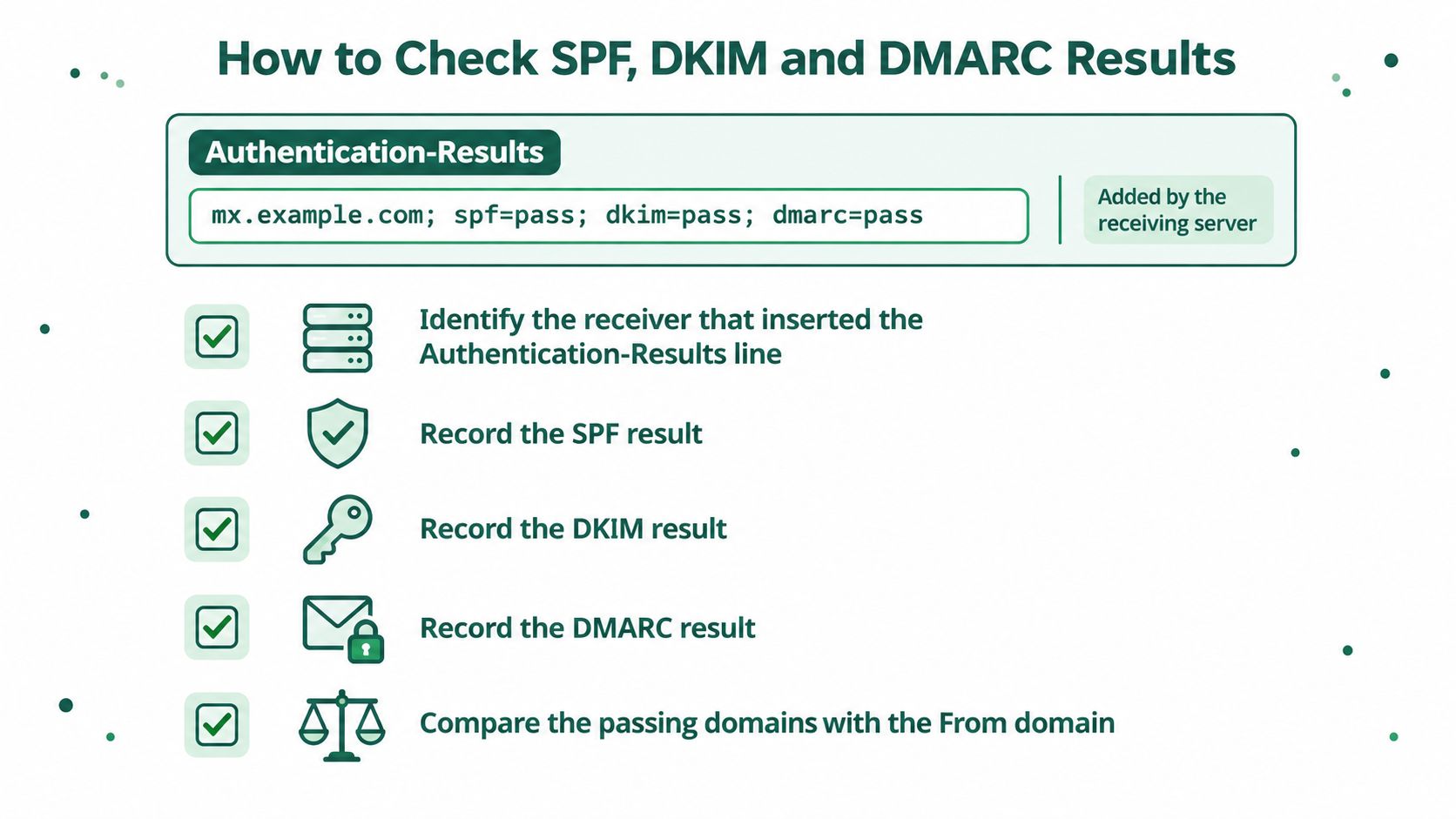
The Five-Step Sequence
- Identify the receiver that inserted the
Authentication-Resultsline. - Record the
spf=,dkim=anddmarc=outcomes exactly as written. - Compare the authenticated SPF or DKIM domain with the visible
Fromdomain to test alignment. - Compare
Return-Pathwith the envelope sender. - Correlate the earliest trustworthy
ReceivedIP with the sending infrastructure you expect.
Step 3 is where most reads go wrong. A pass means a domain was verified, and alignment asks whether that domain is the one the recipient sees.
| Result | Where It Appears | What It Proves | What It Does Not Prove |
|---|---|---|---|
spf=pass |
Authentication-Results | The sending server was authorised for the envelope domain | That the visible From domain is legitimate |
dkim=pass d=domain |
Authentication-Results & DKIM-Signature | The signed content was not altered and the signing domain is named | That the signing domain matches the From domain unless aligned |
dmarc=pass |
Authentication-Results | SPF or DKIM passed and aligned with the From domain | That the message is wanted or safe |
spf=fail or dkim=fail |
Authentication-Results | The check did not authorise the sender on that path | Forgery on its own, since a legitimate sender can be misconfigured |
Pitfalls That Produce Wrong Answers
- Reading Received top to bottom: You reconstruct the route backwards and blame the wrong server.
- Trusting the visible From: A forged address is a claim, not evidence of origin.
- Treating spf=pass as clearance: SPF authorises a server for the envelope domain, which may not be the domain you see.
- Ignoring DKIM d= alignment: A valid signature from an unrelated domain proves that domain signed, nothing more.
A pass on one mechanism with a mismatched From domain is the pattern most worth escalating. That is how a message travels through legitimate infrastructure while impersonating someone else. The opposite also holds. A message can pass every check and still be unwanted, because a compromised real account authenticates perfectly.
When a header points at authentication, verify the DNS layer before touching anything else. Our engagements diagnose problems by starting with raw SMTP header analysis, DNS lookup limit audits, DKIM selector alignment, and real-time Google Postmaster and Microsoft SNDS telemetry. That order matters, because the header tells you which layer to inspect first. You can check your SPF, DKIM and DMARC records against live DNS with the free Email Authentication Checker, which resolves via Cloudflare 1.1.1.1 without caching and probes 18 DKIM selectors automatically, with no account needed and no data stored.
Decide Whether a Header Needs Expert Review
You don't need an expert for every odd header. You need a clear branch, based on whose problem the evidence describes and how reversible your next move is.
Three Branches, Three Different Actions
Branch one, someone else's suspicious message. If it claims to come from a brand, bank or colleague and the route or alignment doesn't fit, don't click links, don't open attachments and don't reply. Report it through your provider's phishing or abuse option and keep your saved raw header. I would also warn anyone else who received it, using contact details you already trust, not details inside the message.
Branch two, your own domain failing checks. If the header shows your domain failing SPF, DKIM or DMARC, check your DNS records first. Confirm the SPF record lists every service that sends for you and that the DKIM selector named in the signature is published. The fault is usually there rather than in the message, and resending the same campaign won't fix it.
Branch three, your bulk mail landing in spam. Treat the header as one piece of evidence, not the whole diagnosis. Most email problems don't start where they appear. The cause may be authentication, DNS, list health, sending behaviour or an automation failure underneath, and a clean header can sit on top of a sick list.
Deciding Rule
If the fix would change DNS or sending infrastructure and you can't roll it back, get a review before you act.
For a quick check of your own domain, the free Email Authentication Checker queries live DNS for SPF, DKIM and DMARC, resolves via Cloudflare without caching, and probes 18 DKIM selectors automatically, with no account needed and no data stored. Run it before and after any change so you can prove what shifted.
Escalate sooner when money, credentials or customer data are involved, when failures affect transactional mail, or when several sending services share one domain and nobody owns the full inventory. Those cases reward a structured email deliverability audit because the header alone won't show an upstream automation fault or a stale sending service nobody remembers authorising.
Otherwise, make the change, keep the before-and-after headers side by side, and check again with a fresh test message. If the new header shows aligned passes from the infrastructure you expect, you're done. If it doesn't, you've preserved exactly the evidence the next person needs, which is the whole point of saving it first.
If your header shows failed or misaligned authentication, unexplained routing, or your own mail drifting into spam, don't guess at DNS changes you can't reverse. Visit Syed Raiyan for a diagnostic that starts with your raw headers, traces the fault to the layer where it originates, and fixes that layer first.